A real multitrack timeline
Place dialogue, music and effects on separate tracks, overlap clips and see the complete arrangement at once.

A focused multitrack audio editor for Mac.
Arrange recordings, music and sound effects across a clean multitrack timeline. Trim, split, fade and balance every clip, then export the complete mix without changing your source files.
Apple checks every release before it reaches you. No card required.
€25 one-time · version 1.x updates included · one app-specific key for up to 7 Macs · no account or subscription.
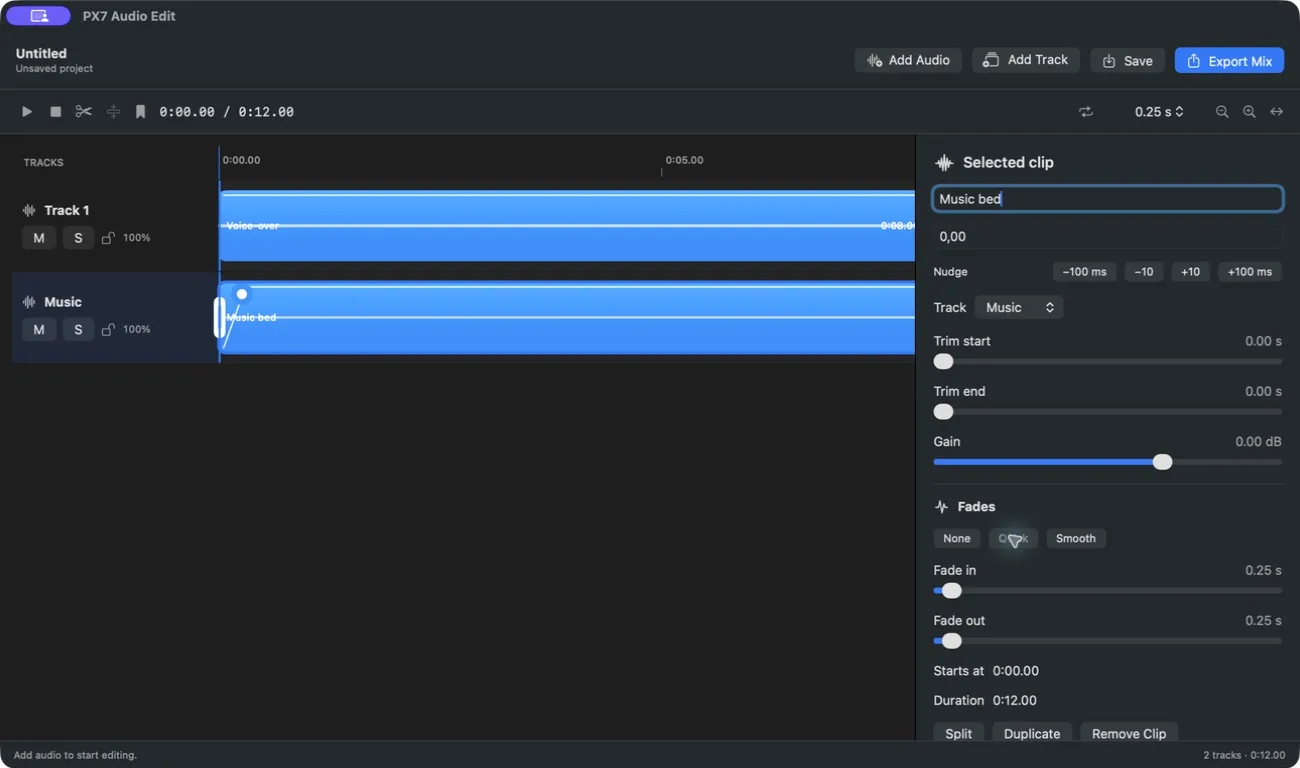
Place dialogue, music and effects on separate tracks, overlap clips and see the complete arrangement at once.
Move, trim, split, duplicate and nudge precisely. The original audio files are never rewritten.
Add independent fades or a matching crossfade between clips. The envelopes are visible directly on the timeline.
Adjust clip gain, track volume, stereo pan and master gain, then mute or solo tracks while you work.
Every clip shows its waveform so edits can follow the sound rather than a filename.
Export the complete mix or one selected clip as WAV, AIFF, M4A or MP3. Measure LUFS, watch stereo peaks and optionally normalize the finished file.
Save a local project and return later. Unsaved work is recovered after an interruption.
Use familiar Mac editing commands for playback, splitting, deletion, undo and redo.
Editing, playback and export happen entirely on your Mac. There is no upload, telemetry or account.
Homebrew
brew install --cask px7digital/tap/px7-audio-editThe public cask pins version 1.1.3 and verifies the downloaded ZIP against its published SHA-256 checksum. The dedicated distribution and support repository documents the release and provides a public issue tracker.
Quick answers